Jun 24, 2015

7 Must Follow Simple and Common Life Rules

Some common rules that can be applied in your daily life. Try to follow them in your LIFE and it could make you a good social player.

"Make Sure That Don't Forgot to Return That Book You Borrowed."

"In Case You Miss A Call, Drop a Message As Soon As Possible If You're Unable to Call."

"When Using Borrowed Computer or Phone, Don't Go Through Their Stuff without Permission."

"Always Leave The Last Piece For The Person Who Brought It, Unless They Insisit They Won't Eat"

"When You Borrow Someone Else's Car, Fill Up the tank As a Way Say Thank You!"

"Don't Smoke When Somone Around you is Visibly Uncomformable."

"Try to Return the favor Within A Week"

Another Life Rules in your mind? Drop them to Comment Box!

Jun 11, 2015

Top 6 Tips for Better Blogging for Your Business

Tips for Better Business blogging

Still thinking about "is blogging important for your business?" You can't ignore blogging if you are serious about your business.

Business blogging is entirely different from personal or professional blogging. The ultimate target of professional blogging is to network with like minded people and also to earn some extra money from the Internet via various advertisements and affiliate marketing methods.

Then why business people blogging without ads or affiliate links? Business blogs stand for improving customer relationships, to get new customers by providing helpful content and also to prove, you are the master in the industry. 

Below are the most important strategies for making your business blog success.


Choose the Right Topic

Choosing the right topic is important. That topic you selected should be useful for you5r current customers or new visitor and should showcase your expertise in the industry.

Craft your Title

Spend more time on crafting the title as it is the key to rank on search engine result pages. Make titles of each posts attractive and SEO friendly with relevant keywords. However, write a title for your readers, not for search engines.

Call to Action

Each blog post should drive readers to do something and never leave them after reading your just one article. CTA (Call to Action) could help you to convert your visitor into leads. Provide links to sign up pages of your website, showing newsletter forms, offering some useful stuff like eBooks or promo codes after subscription are the best example.

Internal Linking: Linking your blog posts to other  "relevant"  blog posts could help you to engaging your reader more time on your blog. Also, this strategy would be useful for internal link building and hence could rank well for targeted keywords

Polishing your Post

Read again and again before moving the cursor to the publish button. This could help you not only to correct the mistakes, but also to include additional data.

Save your article as a draft and read it again after some time. This could also  help you to add some extra details.

Avoid external Advertisements

Some companies accept advertisements for their blog from advertisement network and direct advertisements for a fixed amount or as PPC plan. Accepting advertisements (even may you have blocked competitor ads) for a business blog is not a good idea because you are losing your leads without giving you their information and it pays just some penny only. 

Promote your blog post

Hitting "publish" button is your last task? No.. Your job is not completed yet. You have to ensure your blog post is still reaching to your targeted audience or else your blog might be DEAD and there will be no result for your effort.

There are some simple SEO techniques to make a website or blog search engine friendly.

Social media would the most powerful tool for promoting your blog.

Blog Frequently

Did you know why frequent blogging is important for your business blog? Because google crawls websites / blogs which updates regularly with fresh and quality content and potential customers and other readers revisits blogs which gives them latest information regularly.

Choose the right to time to post your blog post by doing by A/B test researching for getting readers at the moment you publishing it.


Familiar with other business blog tips? Please mention them below. Happy to hear from you also.


May 22, 2015

5 Reasons why Blogging is Important for Your Business


Blogging
Is blogging relevant in todays digital marketing environment? Some debates are going out there. If you want to have your website and business success, Search engine optimization, Social influence and blogging are essential and necessary. 

What is SEO exactly? The fundamental goal of Search Engine Optimization is not cheating the search engine, but the purpose of SEO is to make  a website search engine friendly, to make our website crawled and ranked in relevant  search result pages.

So still, CONTENT IS KING and blogging is the best strategy to create fresh content on your website. 

Reasons why you need to blog:

  • Search engines love fresh content
  • Drive traffic to your website
  • Position your brand as an industry leader
  • Increase SEO/SERP
  • Develop a better customer relationship

Search Engines love fresh content

Popular search engines like Google likes websites which makes fresh content on the web. Search Engine Robots crawls and rank your website frequently only if it is updated with fresh and relevant content. The blog page / blog is the best way to achieve this. Update your blog regularly with business updates, industry news etc. And make search engine loves your website.

Drive traffic to your website

Drive Traffic to your website
Blogging is one of the best strategy to attract new visitors to your website by including most used search keywords in articles. Blog on your website can be the foundation for all social networks. 
Your website may have pages on Facebook, Twitter, or elsewhere. Create useful stuff on the blog and share links to all social media with relevant visuals. The result will be amazing. Trust me!

Position your brand as an industry leader

Blog will change your business
Posting articles which resonate with your industry shows your knowledge, and marketing your skills for the business, and demonstrate your company as an industry leader and so.. You are building trust that you are the best and dependable in the industry. 

After all, you are teaching your potential lead.

Increase SEO/SERP

Fresh content is still the best way to beat your competitors in the Search Engine Result Pages (SERP). 
Search Engine Optmization (SEO)Before starting your article writing, list out relevant keywords, focus on them and hyperlink them to your home page or product or services page which include that keyword.

Also link to other blog articles through hyperlinks and achieve more impressions from your reader.

Develop a better customer relationship

Your blog is the powerful tool to get connected with your customers directly through your website. Your client or potential visitor is able to know more about the products, services and interact  with your company via comments. These comments will be shown to other visitors and lasts than any other social network.

Apr 24, 2015

How to Unboot an Ubuntu Bootable USB

Retrieve full size from bootable USB
Unboot a bootable pendrive| Retrieve full size from bootable USB 
After the releasing of latest Ubuntu (14.04), I made my USB (pendrive) device bootable with Ubuntu 14.04 OS using Power ISO software for having a try.

The pendrive used was with capacity of 32 GB.

After installing Ubuntu on my PC, removed the pendrive and connected it to my laptop which runs on Windows 8.1 OS. But unfortunately it shows only 2.25 MB of total size but the actual capacity of my pen drive was 32 GB. I was shocked and formatted my pendrive many times for retrieving my lost space but still it shows only 2.25 MB of space.

Soon after, I found a solution for this issue, and the solution is, We have unboot the pendrive or any USB device once made it bootable if we need again for storing other files. Windows command prompt can be used for this. 

Steps for Unbooting a USB Device.

Start Administrator's command prompt. For this,

Windows 8 users, press Win + X and then press a.

Windows 7 and lower users, press start button and search for cmd then right click on it and click open as administrator. A black colored window will be opened.

Now we need to enter into disk partition by, 

Enter "diskpart" command on your command window.

Now, in Diskpart, we have to list out the available discs connected to the PC by,

Type "LIST DISK" command. This command will list all disks available in your PC including your USB device and note it's disk number.

Now we are going select the USB device from the disc list by,

Type the command "Select disk <num>" where <num> indicates the USB disk number seen on the disc list.

Now type "List Partition" Command to list our all available partitions in the USB disk.

For every one of them, type: "Select Partition <num>" where <num> is the partition number and "Delete partition". 

After selecting and deleting all partitions, make sure the the disc doesn't contains any partitions left by type the command "List Partition" again. 

If there aren't any, create new partition using  "create partition primary" command. If it asks size just use the default value. 

Now type the command “format fs=fat32 quick”.


buzzoole code
It’s Done 

Apr 2, 2015

Bring Google+ Comments to Blogger Blog - Simple Steps

Bring Google+ comments to blogger blog
 Comments plays a vital role in attracting more readers and helps rank high on search engines at it shows the authority and readership of your blog post.

If you are really serious in blogging, you can't stop sharing your latest blog posts on various social media including Google+, Facebook and Twitter also.

Now Google allows you to bring all your Google+ comments to your blogger blog. Means, all comments you received from Google+ profiles or page shares will be listed below blog post itself.

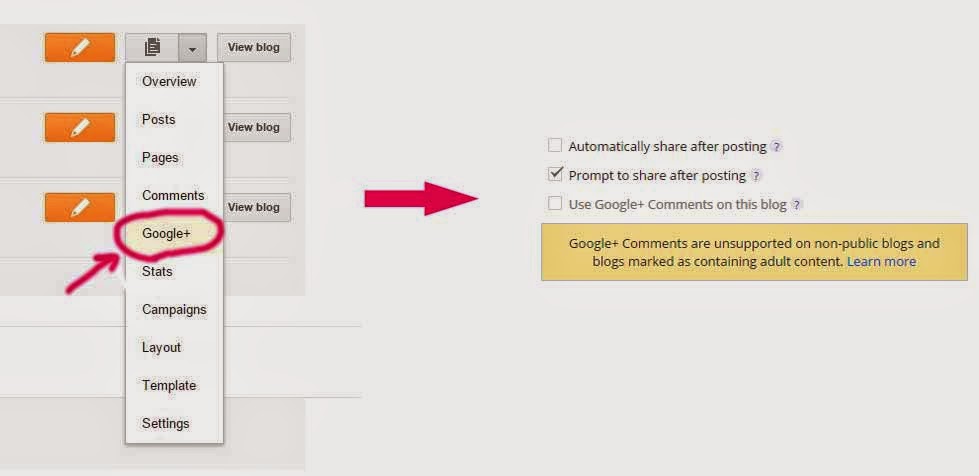
How to bring Google+ comments to Blogger blog?

All you have to do is,


Step 1: log into blogger.

Step 2: Select "More options" from your desired blog

Step 3: Select Google+ tab

Step 4: Tick "Use Google+ Comments on this blog".

Now all comments you received from Google+ will be visible on directly on your blog.